DuoType: a mechanical typewriter for the iPhone Duo
DuoType is a free typewriter that runs in your browser. Fold an iPhone Duo halfway, like a small laptop, and the top screen becomes a sheet of paper on a platen while the bottom screen becomes a deck of round typewriter keys. Every key strikes with a sound, the carriage slides along the line, and a bell rings as you near the right margin. There is no account to create and nothing to install.
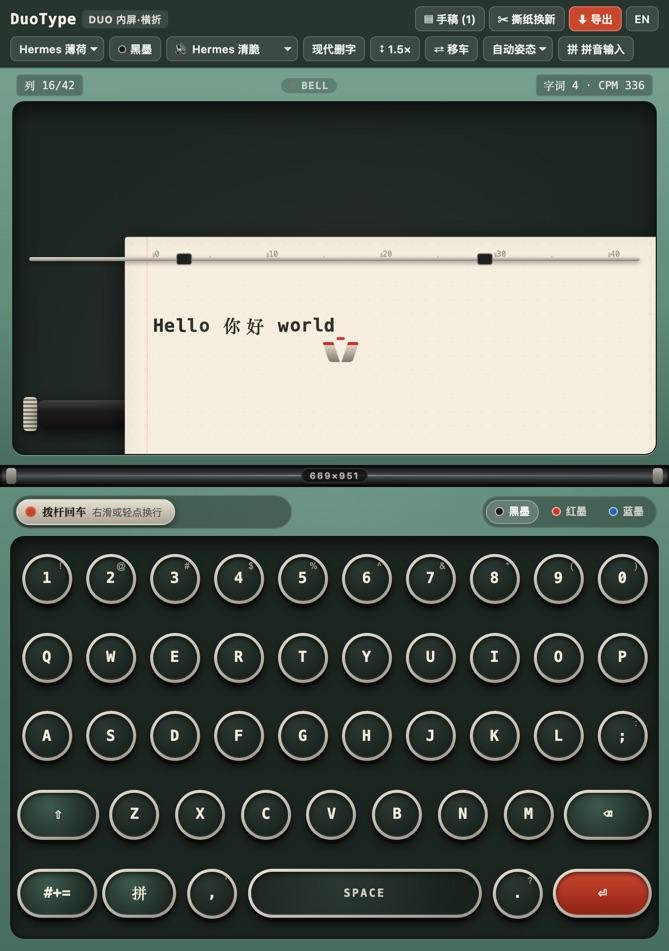
How to use it on the iPhone Duo
DuoType reads the screen size and orientation and picks a layout for the way you are holding the phone. You can also choose a posture by hand from the toolbar.
| Posture | How you hold it | What you get |
|---|---|---|
| Laptop (clamshell) | Inner screen, half folded, hinge running across | The paper and platen sit on the upper half; the full key deck sits on the lower half. |
| Book | Inner screen opened flat in landscape | A wide sheet beside the keys, good for longer lines. |
| Compact | Closed, using the cover screen | A smaller page with a compact keyboard for quick notes. |
- Open duotypewriter.com in Safari.
- Fold the phone to about 90–120 degrees and set it on a table.
- Tap the round keys. Swipe or tap the return lever to start a new line.
- When the page is done, tap Export, or tear it off to start a fresh sheet.
Features
Sound and feel
Choose between several key sound profiles, a quieter one, or mute. A bell rings near the end of each line. On devices that support vibration, keys also give a short haptic tap; iPhones offer more limited haptics in the browser, so this depends on your device.
Machines and ink
Three machine finishes (mint, red and dark titanium) and three ribbon colors (black, red and blue). Line spacing can be single, one and a half, or double.
Backspace the old way
Pick modern backspace, which erases, or overstrike, which moves the carriage back so you can type over a letter just like on paper.
Any language
Turn on IME mode to type through your system keyboard, so Chinese pinyin and other input methods work. A physical keyboard works too.
Sheets and export
Each page you tear off is kept as a sheet you can reopen later. Export a sheet as a PNG image that looks like typed paper, as plain text, or as Markdown, or copy the text to the clipboard.
Works offline
Add DuoType to your home screen and it opens full screen. After the first visit it keeps working without a connection.
Privacy
What you type stays on your device. Sheets are saved in your browser's local storage and are never uploaded. Clearing site data or switching browsers removes them, so export anything you want to keep.
To see how the site is used, DuoType uses Microsoft Clarity, which records anonymous usage such as page views, clicks, taps and scrolling, and sets cookies to do so. The whole typewriter area is masked, so Clarity never receives the text you type. See the Microsoft Privacy Statement for how Microsoft handles this data.
FAQ
Is DuoType free?
Yes. DuoType runs in the browser, is free to use and needs no account.
Do I need an iPhone Duo to use it?
No. The layout is tuned for the iPhone Duo's folded and unfolded screens, but it also works on other phones, tablets and desktop browsers, including with a physical keyboard.
Where is my writing stored?
Your sheets are saved in your browser's local storage on your own device. Nothing you type is uploaded. Clearing site data or switching browsers removes them, so export anything you want to keep.
Can I type Chinese or other languages?
Yes. Turn on IME mode to type through your system keyboard, which lets you use Chinese pinyin and other input methods.
How do I save or share a page?
Use Export to download the sheet as a PNG image, a plain text file or Markdown, or copy the text to the clipboard.
Can I install it on my home screen?
Yes. In Safari tap Share, then Add to Home Screen. DuoType opens full screen and keeps working offline after the first visit.
中文简介
DuoType 是一个免费的浏览器打字机,为 iPhone Duo 折叠屏设计:像笔记本一样半折,上半屏是稿纸,下半屏是圆形键帽, 行尾会响铃,可以切换音色、墨色和机身配色,支持中文输入法,写完可以导出为 PNG、纯文本或 Markdown。 无需注册,内容只保存在你自己的设备上。立即开始打字。